Arivu From the Terminal
The new Arivu CLI brings saving, search, imports, analytics, local stack control, and graph exploration into a terminal-first workflow.
Arivu started as a web app and browser extension because that is where most bookmarking happens. But a second brain should not disappear the moment you leave the browser. Research, writing, operations work, and development all move through the terminal too.
The new Arivu CLI brings the same intelligence layer to command-line workflows. You can save links, search by meaning, inspect bookmarks, import exports, check reading stats, manage local profiles, explore graph connections, and boot a local Arivu stack without switching context.
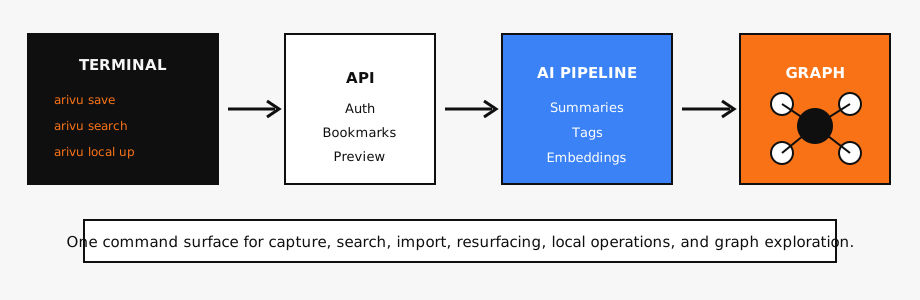
Historical diagram of the CLI workflow described in this post.
A Terminal Client for Your Second Brain
The CLI is bundled with the backend and exposed through the arivu command. It works as a client over the same API used by the web app, so the behavior stays aligned: bookmark ingestion still triggers AI processing, search still combines keyword and semantic matching, resurfacing still uses the same memory system, and graph commands still query the same knowledge layer.
The core workflow is direct:
arivu save https://example.com/article
arivu search "python embeddings"
arivu show <bookmark-id>
arivu open <bookmark-id>
Saving a bookmark from a shell script, terminal note, research session, or clipboard now takes one command. Search works the same way: describe what you remember, and Arivu looks through your saved knowledge by meaning instead of forcing exact title recall.
The CLI also handles everyday maintenance:
arivu list --unread
arivu list --collection Research
arivu list --since 2026-01-01
arivu delete <bookmark-id>
arivu stats --monthly
For large save sessions, arivu save accepts multiple URLs at once and reports which links succeeded or failed. That makes it useful for cleaning up reading lists, moving links from notes, or capturing a batch of research sources before a project begins.
Local Arivu, One Command Closer
Self-hosting should be practical, not theatrical. The CLI now includes local stack commands for people who want to run Arivu on their own machine and use it from the terminal.
arivu local up
arivu local status
arivu local logs backend
arivu local down
The local command discovers the repo root, checks the expected Docker Compose setup, validates the root .env, and creates a local profile that points to http://localhost/api. Once the stack is up, you can authenticate and use the same command surface against your local instance:
arivu auth login --profile local
arivu save https://example.com/article
arivu search "example topic"
This matters for self-hosters and contributors. You can run a full local Arivu instance, save real bookmarks into it, inspect behavior from the terminal, and pull recent logs when something needs debugging. It turns local operation into a repeatable workflow instead of a handful of remembered commands.
Safer Preview and Imports
The CLI includes a preview command for checking a URL before saving:
arivu preview https://example.com/article
Preview now goes through the authenticated API instead of making an unauthenticated local terminal fetch. That keeps URL safety behavior in one place. The same server-side checks used by bookmark ingestion apply to preview requests, including private address blocking and redirect validation before content is fetched.
Imports are also available from the terminal:
arivu import pocket pocket_export.html
arivu import raindrop raindrop_export.json
Large bookmark histories are supported with the same 50MB import limit on both the CLI and backend. Unsafe URLs are skipped before placeholder bookmarks are created, so imported files do not bypass the same safety rules used by normal saving.
Built for Power Users, Not Separate From the App
The CLI has named profiles, token-based auth for terminal clients, shell completion, and an interactive mode:
arivu profile add local --url http://localhost
arivu profile use local
arivu auth whoami
arivu --install-completion
arivu interactive
Profiles make it possible to switch between a local instance and a hosted deployment. CLI auth uses bearer tokens returned through dedicated terminal endpoints, while the browser app keeps its cookie-based session flow. The result is a cleaner separation between browser sessions and terminal automation.
Power-user commands expose deeper Arivu features without opening the dashboard:
arivu collections list
arivu resurface list
arivu resurface snooze <bookmark-id> --days 14
arivu graph search "memory systems"
arivu graph overview
This does not replace the web app. It extends Arivu into the places where knowledge work already happens: shell history, scripts, local development, research notes, and long-running self-hosted setups.
Other Changes
- CLI configuration now supports
ARIVU_PROFILEfor selecting the default profile andARIVU_CONFIG_DIRfor custom configuration storage. - Remote CLI profiles require HTTPS, while localhost remains allowed for local development.
- CLI profile loading revalidates stored URLs so older insecure profiles are not silently reused.
- CLI tokens are stored locally with restrictive file permissions.
- Dependency and audit fixes landed alongside the CLI work to keep the product current after the open-source release.
Arivu now has three first-class capture surfaces: the dashboard, the browser extension, and the terminal. Save from wherever you are working, then let the same AI layer organize, summarize, connect, and resurface what matters.