From Saved Links to a Real Second Brain
Arivu now has a full working loop: capture anything, triage it in your Inbox, work from Focus, and let Review bring back what matters. Plus standalone notes, links, tasks, and reminders.
Context, 2026-07-11: This post records the Capture, Inbox, Focus, Review loop as it launched. Arivu now leads with a broader connected-knowledge loop, Capture, Connect, Discover, Learn, while Inbox, Focus, and Review remain available as supporting workflows. See Arivu Is About Connected Knowledge Now.
For most of its life, Arivu answered one question well: where do I put this link so I can find it later?
That is a good question. It is also not the whole job. The hard part of a second brain is not saving. It is deciding what a save should become, doing something with it, and being reminded of it at the right time. Saving is easy. Following through is the part that quietly falls apart.
So this release turns Arivu from a place where links land into a place where knowledge moves. There is now a real working loop: Capture, Inbox, Focus, Review. And the things you capture are no longer just bookmarks. Notes are first-class, items can link to each other, and anything can carry a task or a reminder.
Later updates build on this loop with document and transcript imports, typed knowledge objects, topic evolution, and a Today board for recent decisions and meetings. See Research Has More Shape Now for that next layer.
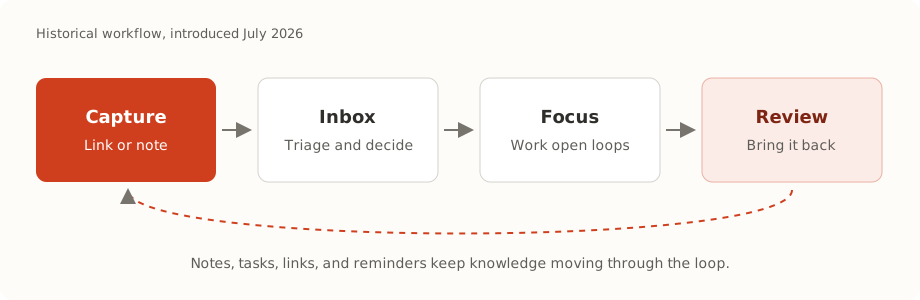
Historical diagram of the workflow introduced in this post.
The Loop
The whole system is built around a loop you can actually run every day.
You capture something. It waits in your Inbox until you decide what it is. If it needs action, you work it from Focus. Later, Review brings back what is due, what is still open, and what is worth a second look. Then the loop continues.
Capture Anything
Capture still starts where it always did: paste a URL on your dashboard, save from the browser extension, share into the app, or run arivu save from the terminal. Arivu archives the page, cleans it up for reading, and gets to work in the background.
But now capture is not limited to the web. Standalone notes are first-class. Open the Notes area, write down a thought that never started as a link, and it enters the same loop as everything else. A note is not a second-class citizen pinned to a bookmark. It is its own item, with its own workspace.
Inbox: Decide What It Becomes
Everything you capture lands in your Inbox. This is where you decide, quickly, what each item should become.
Each item moves through four plain-language stages: Inbox, Working, Kept, and Archived. You set an importance level and a next action, and move on. When you have a pile to get through, bulk triage lets you move many items at once, and keyboard shortcuts make single-item triage fast: with an item focused, press P to mark it Working, D to keep it, or A to archive it.
The point of the Inbox is emotional as much as functional. An unsorted pile of saves is a low hum of guilt. A short triage pass turns that pile into decisions, and decisions are calm.
What this means for you: New saves stop piling up silently. A few minutes of triage keeps your collection intentional instead of overwhelming.
Focus: Work Your Open Loops
Some items are not just things to read. They are things to do. An article you need to act on. A note that is really a task. A page you want to come back to on Thursday.
The new Focus page gathers those open loops in one place. It defaults to what is pending, and you can switch views to see what is overdue, due today, coming up, or already completed. Instead of hunting through your collection for the things that still need you, Focus shows them directly.
Open loops come in two shapes:
- Tasks (action items) are simple checklist items attached to a bookmark or a note. Undated, just a thing that is not done yet.
- Reminders have a due time and know what timezone they are in. They can repeat on a schedule, and when email is configured, a reminder can reach your inbox at the right moment. In the app, reminders carry their own due state so you can see what has come due.
Both tasks and reminders can hang off a bookmark or a standalone note, so the thing you need to do stays attached to the thing it is about.
What this means for you: The commitments hiding inside your saves become a real, workable list, not a vague intention.
Notes and Links: Connect the Dots
Saved knowledge is more useful when it is connected. Alongside the AI-discovered relationships in the Knowledge Graph, you can now make your own explicit links between items: bookmark to note, note to note, note to bookmark. Every link is two-way, so from either side you can see its backlinks, the other items that point at it.
The note workspace ties this together. Open a note and you can edit it, add tasks and reminders, link it to bookmarks and other notes, and see everything pointing back at it. A note becomes a hub, not a scrap.
What this means for you: You can build the connections that matter to you by hand, on top of the ones the AI finds automatically.
Review: Bring It Back
The last piece of the loop is Review, and it is smarter than a simple resurfacing feed.
Review looks across your collection and brings back the items that deserve attention now: things you started working on, high-importance saves, items with an explicit next action, reminders that have come due, tasks that have gone stale, older notes you never revisited, and links your resurfacing signal thinks are relevant again. Crucially, each item explains itself. Review tells you why it came back, so a resurfaced item is a prompt you understand rather than a random blast from the past.
You can complete a review item or snooze it, and the loop keeps turning.
What this means for you: The good ideas you saved months ago come back when they are useful, with a reason attached, instead of disappearing into the archive forever.
Other Changes
- Note workspace at its own address so a note is a real page you can open, link to, and work in, not a dashboard side panel.
- Reader that captures selections as quote annotations you can edit or delete inline, so highlights become durable notes on a page.
- Inbox and Focus use plain labels (Inbox, Working, Kept, Archived) instead of internal state names, so you never have to think in the system’s vocabulary.
- Everything is backed up. Notes, links, tasks, reminders, annotations, and review history are all included in JSON export and restore.
Arivu started as a better place to save links. It is now a place to think: capture what catches your attention, decide what it should become, do the work it implies, and get it back when it counts. Same warm, self-hosted app. A much bigger job.