Share the Source, Not Your Private Workspace
Arivu now publishes revocable, point-in-time secret-link snapshots while keeping private notes and relationships out of the public copy.
Sharing research should not require sharing the workspace where you interpreted it.
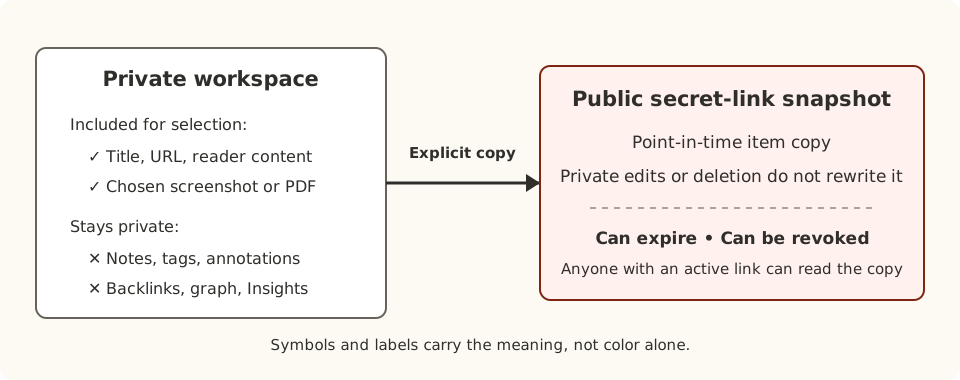
Arivu now lets you publish a deliberate secret-link snapshot from a bookmark. The public copy contains selected source fields and sanitized reader content, while private notes, tags, annotations, backlinks, graph connections, and Insights stay out.
Make Publication Explicit
Open a bookmark’s Share disclosure, create the public link, and copy its unrepeatable token when it is shown. Settings keeps a list of shares so you can manage them later.
The bookmark disclosure creates an item-only share. Authenticated share APIs and local automation can deliberately include a selected screenshot or PDF. Other artifacts do not cross the public boundary automatically, and raw or self-contained HTML artifacts are not publicly served.
Anyone with an active secret link can read the snapshot. That makes the link convenient for a bounded audience, but it does not make publication private in the same sense as your authenticated workspace. Choose the evidence accordingly.
Keep the Published Record Stable
A snapshot item is a point-in-time copy made at publication time. Editing or recapturing the private bookmark does not silently change what a reader sees. Deleting the private bookmark also does not break an active public snapshot.
This separation is useful when another person needs to evaluate the published evidence. Corrections remain deliberate: an authenticated update can replace share membership under the same secret link rather than assuming a private edit has rewritten history.
Set an expiry when access should stop on a known date. Revoke or delete the share when it should end immediately. A share can also expose a bounded RSS feed for its newest published items.
A Publishing Boundary, Not a Social Layer
Secret-link snapshots do not add profiles, followers, comments, collaborative editing, or a live public workspace. They are a narrow publication mechanism for evidence you selected.
Existing bookmarks, private fields, deep links, imports, exports, browser capture, and CLI authentication remain compatible. CLI-audience automation routes can manage shares within the same ownership boundary, but no new top-level CLI command is implied.
The result is a clearer separation: keep interpretation and working relationships private, then share a stable source snapshot when another person needs the evidence.
See Preservation and Sharing for snapshot contents, expiry, revocation, public RSS, and backup implications.